

learn how to use WinRAR software. WinRAR is basically used to compress the larger file. It is best suitable for mailing files online by reducing the size.
First of all if you don’t have WinRAR installed then you can get it from below link.
How To Use WinRAR For Creating Archive
Compressing 3 PDF files and creating RAR archieve. Usually people use it for the larger files. WinRAR reduces the size of a file into RAR and ZIP file format.1) Select the files which you want to compress and do a Right Click on the selected files. Choose ‘ADD TO ARCHIEVE’.
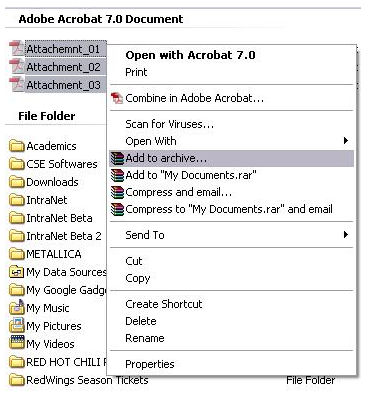
2) New window will prompt.Choose RAR format

WinRAR GENERAL TAB
1)ARCHIEVE NAME:
- ZIP extension(.ZIP)- can be opened with WinRAR and WinZip.
- RAR extension(.RAR)-can be opened with WinRAR but not with WinZip.
3)SPLIT METHOD: leave it Blank now.
4)UPDATE MODE: Add and replace file.
5)ARCHIEVE OPTION: donot select any.
ADVANCED Settings TAB in WinRAR
Set the password if you want to make your file password protected.Remember your password if you forgot it there is no way to unZip it.
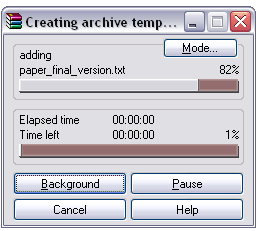
3) when you are ready to zip the file.Click ‘Ok’. WinRAR will start to compress .
How To Use WinRAR For Extract/Unzip/Decompressing
1) Right Click on the RAR or ZIP file an
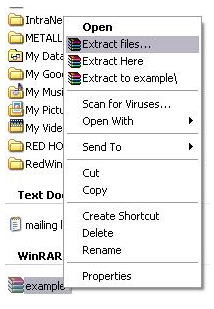
choose the ‘EXTRACT FILES…’
2) Extraction window will be prompt and select the destination where you want to unzip the file.
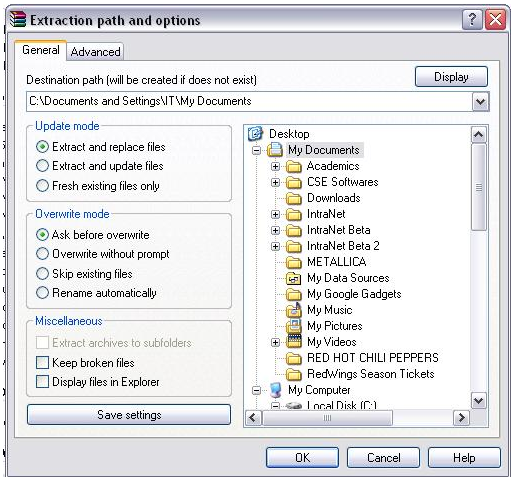
3)Click OK when destination is selected.Now WinRAR will start to UNZIPPING.
0 comments:
Post a Comment