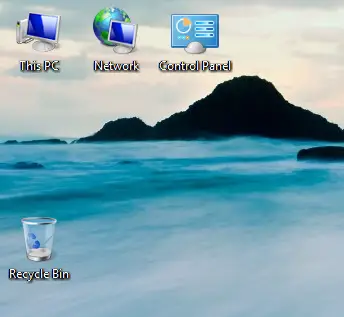
‘My Computer’, the favorite and most used icon in Windows OS desktop is not included in latest Windows 8.1 or 8 by default. Also, as you know these operating systems will boot directly into metro UI mode instead of desktop mode. Even though you can make Windows 8.1 to boot into desktop mode directly, but still the My computer icon will be missing in it. Here is a simple and quick way about how to show my computer icon on Windows 8.1 and 8 desktop..
In earlier Operating Systems, like Windows 7 and Vista you can go to start menu and select ‘Show on Desktop’ for My Computer icon to show it in desktop. But, the traditional start menu also missing in these two operating systems, therefore ‘Show on Desktop’ is not applicable here.
Having the ‘My Computer’ icon on desktop will ease the access of disk partitions, folders, computer management, device manager and properties in your desktop or laptop computer..
Sysprobs already covered several guides about Windows 8/8.1, find few belowHow to install Windows 8.1 on VirtualBox
How to shutdown Windows 8 in Several Ways
To Show My Computer Icon on Windows 8.1 & 8 Desktop
The involved steps to show my computer icon on Windows 8 or 8.1 desktops are very similar, therefore I’ll be explaining the steps with single OS only..
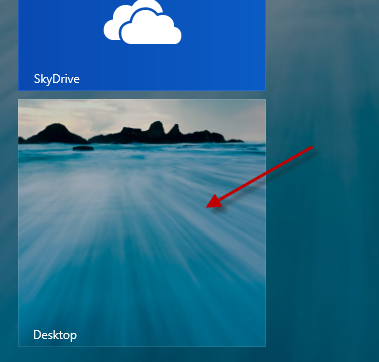
1) Click on the Desktop tile in Metro UI (as shown below). This will bring the normal desktop.
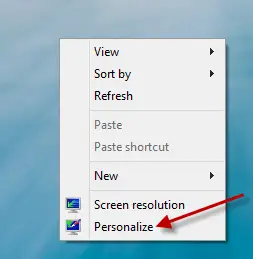
2) Right Click on the blank space and select Personalize.
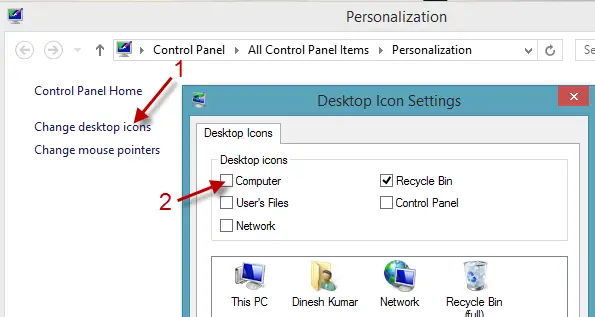
3) In next screen Click on ‘Change desktop icons’. Select the icons that you want to display in your desktop. Checking ‘Computer’ check box will show the my computer icon. I prefer to have Control Panel and Network icons also on my desktop.
After applying you would be seeing My computer icon on Windows 8.1 and 8.